Find any skill fast
Search by name, description, path, or metadata. Filter by runtime, validity, provenance, source, or update state. Group only when real data supports it.
 Skillglass
Local inventory for agent skills · Open source
They’re scattered across global folders, projects, packages, and plugin caches. Tell Skillglass where it can look. It shows what every skill does, where it came from, and which copy takes effect when two share a name.
Everything stays on your machine. No account, no cloud, no telemetry. Skillglass reads by default and shows you every change before it writes.
macOS · Windows · Linux — Omarchy package candidate
How it works
Skillglass proposes roots for the runtimes it finds and labels each one writable, managed, read-only, or missing. You decide what gets scanned.
The scan only reads. You get the name, description, canonical path, scope, provenance, and validity of every installation it finds.
Open any skill and see how it works. If you edit or create one, Skillglass shows the plan and exact diff before writing, then keeps a snapshot you can undo.
Capabilities
Search by name, description, path, or metadata. Filter by runtime, validity, provenance, source, or update state. Group only when real data supports it.
When two skills share a name, Skillglass points to the exact file that wins in each scope and the installations left shadowed.
Check SKILL.md and its local resources statically. Imported content is never executed.
Install from a folder or ZIP into an approved root. See the plan first; then Skillglass writes atomically and keeps a recoverable snapshot.
Preview, Code, and Changes work from the same observed installation. You see exactly what will change before applying it.
The persistent journal recovers interrupted operations and keeps undo available between sessions.
The interface
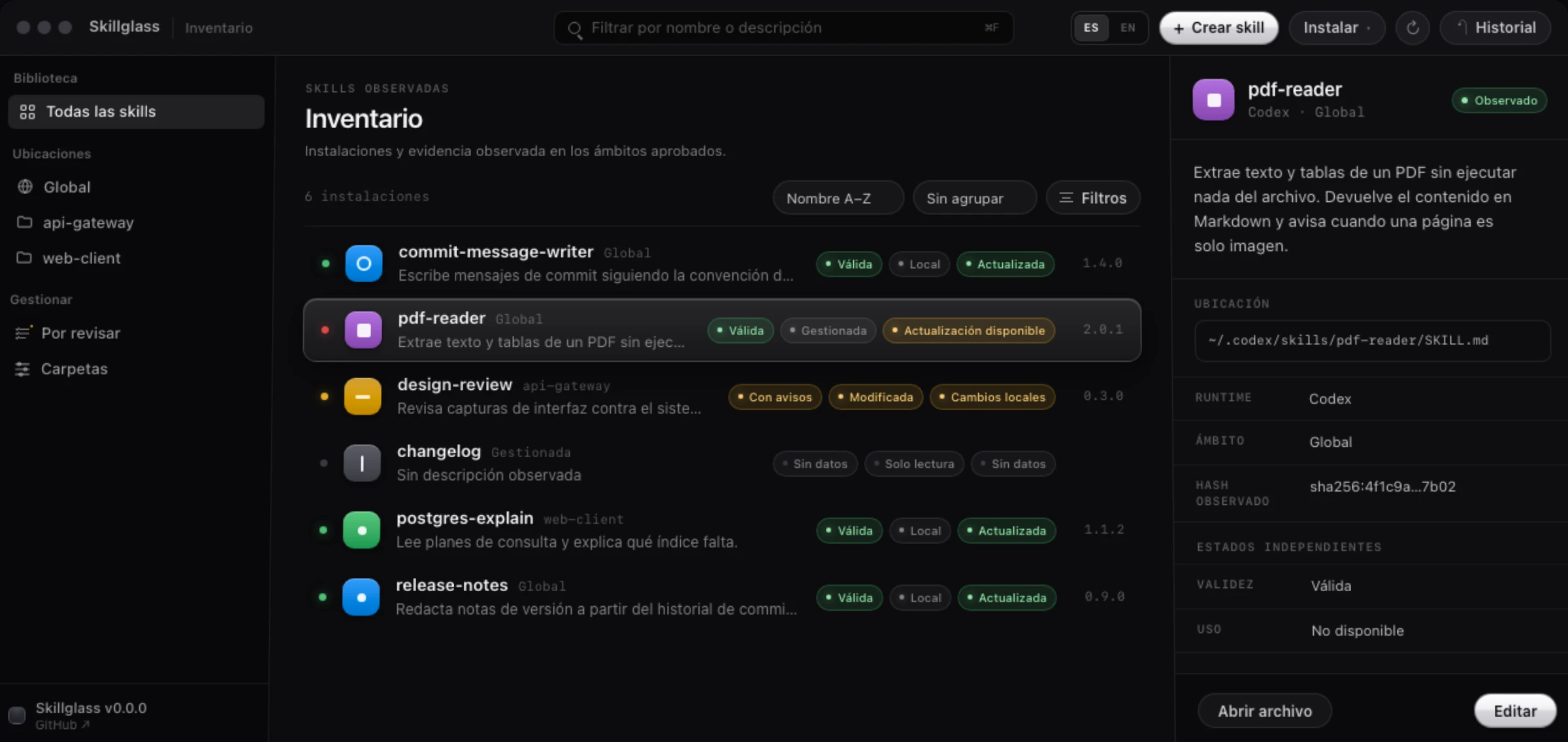
Validity, provenance, and update status mean different things, so Skillglass keeps them separate. If the data is not there, it says “No data.”
Inventario · 6 instalaciones
2.0.10.3.0—The dot on the left shows update status. Green: current. Amber: local changes. Red: update available. Grey: not enough data.
Safety boundaries
Skillglass is conservative on purpose. These are product boundaries, not features waiting to happen.
Download
Download the source, inspect exactly what you will run, and generate the native installer for your system using the versions pinned by the project.
Official binaries, when available, will live only on GitHub Releases and include SHA256SUMS.txt and build-metadata.json.
Platforms and requirements
Questions
No. Reading changes nothing. Every write starts with a plan you accept and ends with a recoverable snapshot and journal entry.
No. Rollback works only for the exact, unchanged tree created by a recorded operation. It is not a general uninstaller.
Not yet. The MVP has no remote registry or arbitrary URLs. You install from a folder or ZIP into an approved root.
Not in this version. Agent analysis and rewriting, if they arrive, need a different product contract. Today you get a clear editor and the exact diff.
A SQLite index and recovery material inside your per-user application-data directory. On POSIX, the directory uses 0700 and the database 0600. Nothing is uploaded.
The latest 30 snapshots per installation, or every snapshot from the last 90 days—whichever preserves more recoverable history. The current snapshot is never pruned.
Skillglass is under active development and the code is open. To propose a change, start with CONTRIBUTING. To report a vulnerability, go to SECURITY.